Blog and Linked List

I post anything I find intersting or entertaining -- from tech news to book quotes to new sites I've found (and tips on web development, in general).

Light Field Cameras by Lytro

Via Lytro:

How does a light field camera capture the light rays?

Recording light fields requires an innovative, entirely new kind of sensor called a light field sensor. The light field sensor captures the color, intensity and vector direction of the rays of light. This directional information is completely lost with traditional camera sensors, which simply add up all the light rays and record them as a single amount of light.

The premise is simple: instead of capturing red, green and blue color values and compositing them into a static image like traditional CCD or CMOS image sensors, this new sensor records other and more useful properties of the light hitting it that allow for a more accurate reconstruction of the scene after processing.  I’m not just talking about better white balance or being able to retrieve information “lost” in the highlights or shadows — you can actually refocus the image while post-processing it.  Amazing

Although I’m not a huge fan of the way they’re trying to market it, the science behind the idea is sound and could revolutionize not just photography but digital imaging in general.  Whereas CCD and CMOS sensors are effectively trying to replicate the way that images are stored onto film, these new Light Field Sensors are innately digital and show a huge leap forward in terms of the thought process behind digital imaging.

In particular, I’m excited about the applications to the medical imaging field — what happens when we replace the typical CCDs with these Light Field Sensors?  We’ll be able to capture the entire scene as it is, not as it’s seen through the ‘eyes’ of a sensor.  I, for one, am excited.

Get nerdy and read the founder’s dissertatation here.

Moo Cards!

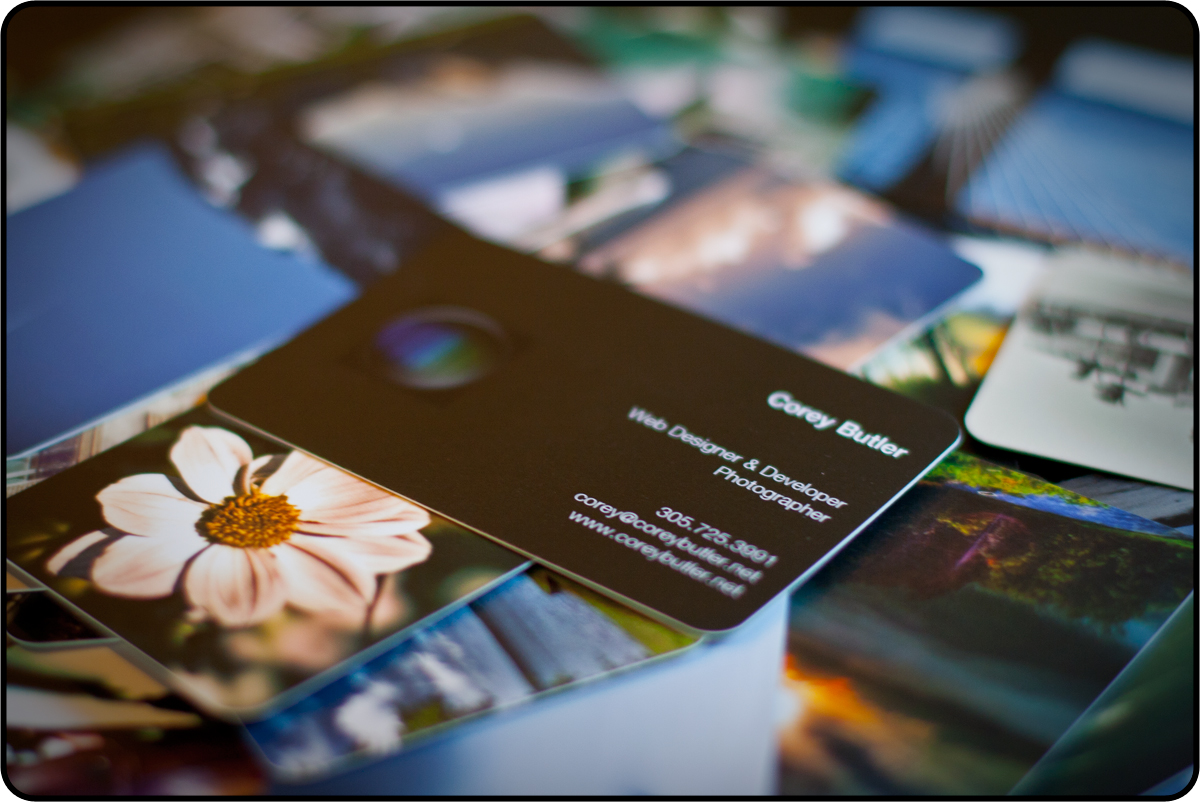
I got me some Moo Cards!

They’re really great quality for the price and quantity, and their online tools are a pleasure to use.  My favorite feature: it’ll grab all your photos Flickr (and you can sort by album), so no need to waste time uploading – just select your photos, create your layouts, and your done.

My (first) order was just 50 to test the quality – color me impressed. Really pleased with how they came out.  I’m totally digging the rounded corners!

If you want to order some of your own, please use my referral link (and hey, you’ll save yourself 10% in the process!)

Wunderkind Login / Signup UX Win

I used Wunderlist as a GTD tool when it first made its iOS appearance.  That lasted about a week before I reverted back to my default task management tool – my (really, really bad) memory.  Suffice it to say, when it showed up on the Mac App Store as a featured app this week, I decided to give it another go.

I’m not going to give any kind of review of the app, or the service (but, I have to say, if you’re looking for a way to keep all your tasks in sync across all your devices, this has to be the cheapest way — it’s free).  I wanted to point out a nice UX feature of the website — the single signup / login form:

Already have a Wunderlist login? Great, use it.  Don’t have one yet? Just enter your email address in the same field.  Also, I’m personally a fan of allowing Facebook login for those potential users who are a little queasy about setting up another account with a another service.

Anyways, props to 6wunderkinder for the great app and simple login experience.  See it for yourself here.

Apple’s Back to School Offer 2011

Via Apple.com:

Here’s the deal:

When you buy a new qualifying Mac with Apple education pricing* from June 16, 2011, through September 20, 2011, you’ll get a $100 Back to School Card to use on the Mac App Store, the App Store, the iTunes Store, and the iBookstore.

I’m not sure exactly when Apple started doing their Back to School offer for students, but for the better part of the last decade they have been essentially giving away free iPods with the purchase of a Mac to qualifying students in the summer.

This year marks a big change in the deal, whereby you’ll receive an iTunes/App Store gift card instead of a “free” iPod. Still, it’s an awesome incentive on top of already discounted prices for students.

Windows 8 on Arm

Via ArsTechnica:

ARM Windows won’t include an x86 emulator, and as such will not be able to run existing Windows programs. It is, however, the same operating system with the same APIs, meaning that it should be possible to recompile existing software and device drivers for ARM Windows with few difficulties. The same applications should, therefore, become available on both platforms, as should access to the same hardware.

So, as soon as they’re (nearly) done transitioning their user base from 32-bit -> 64-bit OS, drivers and apps, Microsoft is going to force another bifurcation, but for what benefit? The advantages of running on ARM will likely be negated by background Windows processes.

Or, maybe they’re banking on ARM Windows 8 taking a sufficient amount of time to come to market that they’ll be able to get “all day” battery life on their tablets.  Meanwhile, your iPad will last all week under full use.

Update 5:41pm: Apple has avoided issues like this in their architecture switches (most recently, PPC -> x86) by allowing for Universal Binary applications, containing the code for both architectures all in one App bundle.  For the sake of their users, Microsoft should implement this.  Or perhaps they’re expecting everyone to buy Office 2012 ARM edition for their tablets and a separate x86 edition for their laptops and desktops.

This Week in Twitter [Updated]

It’s been a big week for twitter, with some official (an unofficial) announcements:

  1. Yesterday, the introduction of the official Follow button (which you can conveniently try out in my footer).  This is iFramed out, just like the Tweet button, which allows for more information to be displayed — in this case, the number of followers.

    As an aside, I’ll be writing a post at the end of the week about how to make these iFramed buttons work correctly on AJAXed sites

  2. Today, we got the official announcement of native photo support and revamped search, active now on Twitter.com and coming soon to devices. This sparked an interesting debate I stumbled upon regarding the archiving process of tweets and their accessibility in search (quick summary: they’re not there, because it’s too hard right now, but maybe they will be there sometime):
  3. Along the lines of the twitter photo integration, there have been rumors floating around this week that twitter functionality will be fully baked into iOS5, bringing its social media sharing capibilities more inline with what we see in Windows Phone 7 or HP’s WebOS.

Whichever way it goes with iOS integration, it’s nice to see twitter taking hold of its own platform.

Update 6/2/2011: ArsTechnica puts the new Follow button to good use on the Twitter page on their site

Site Redesign Features

A redesign of my personal site has been long overdue, but I finally got the inspiration, motivation and the time to give the site a much-needed overhaul. Here’s what’s new:

  • Backend completely powered by WordPress, using a custom post type for my web development portfolio and traditional posts for the blog/linked list.
  • Linked list functionality achieved by custom post meta data, giving any traditional post the ability to not only have a source link, but have that source link be the default link for the post. I’ll write a post about that sometime soon!
  • A complete visual redesign. CSS3 everywhere, AJAX-ified for a more fun experience, and just all around easier on the eyes. I even threw in some webkit keyframe animations, so if you’re not using a webkit brewer, make sure to check it out in one (use the contact form to email me and you’ll see!).
  • A real photo portfolio, grabbing my photos from flickr and spitting them out on my site in a pretty neat way. On the photo page, you can not only see when and where the photo was taken, but you’re given a download link so you can use the image as your background without having to drudge through flickr.

AJAX + WordPress, made easy

One of the main reasons I redesigned my site – beyond the obvious facelift – was to give it a much needed new backend.  Everything is now powered by WordPress, which is awesome for control and simplicity, but isn’t exactly known for its AJAX prowess.

As a theme developer, I have been using a little technique to AJAX-ify WordPress themes for a while.  In the page template, you can use PHP to find out how the page was requested — was it an AJAX request, or was it a traditional page request? :

$isXHR = (isset($_SERVER['HTTP_X_REQUESTED_WITH']) && ($_SERVER['HTTP_X_REQUESTED_WITH'] == "XMLHttpRequest"));

Then, with a few conditionals, you can customize your template so things like the header (get_header()), footer (get_footer()), and sidebar (you guessed it, get_sidebar()) get left out of the page request if it was an AJAX request.

For example:

if (!$isXHR) get_header();

This is a clean and efficient way of serving up just the page content without the headers, footers, and whatever other content you want to omit from the AJAX request.  Less content = smaller file size = faster load time = less waiting for your visitors.

See it in action in the individual photo pages of my portfolio.